While SIEM logs tell you what happened on your network, YARA rules empower detection engineers to uncover exactly how the weapon was built by hunting for distinct malware fingerprints. This guide breaks down the anatomy of writing high-fidelity YARA rules using hexadecimal patterns and wildcards to detect obfuscated payloads without destroying endpoint CPU performance. Finally, we will operationalize these signatures by piping YARA hits directly into Splunk, instantly transforming static file detections into dynamic, enterprise-wide behavioral hunts.
In the detection engineering phase, YARA is the undisputed industry standard for pattern matching. Often described as the “pattern-matching Swiss Army knife” for malware researchers, YARA allows blue teams to write custom, high-fidelity signatures to identify malware families based on textual or binary patterns.
Whether you are a Tier-1 analyst trying to understand how your antivirus engine flags a file, or a Tier-3 detection engineer hunting for undocumented zero-day payloads in volatile memory, mastering YARA is a mandatory skill. Here is the operational blueprint for writing and deploying YARA rules in a modern SOC.
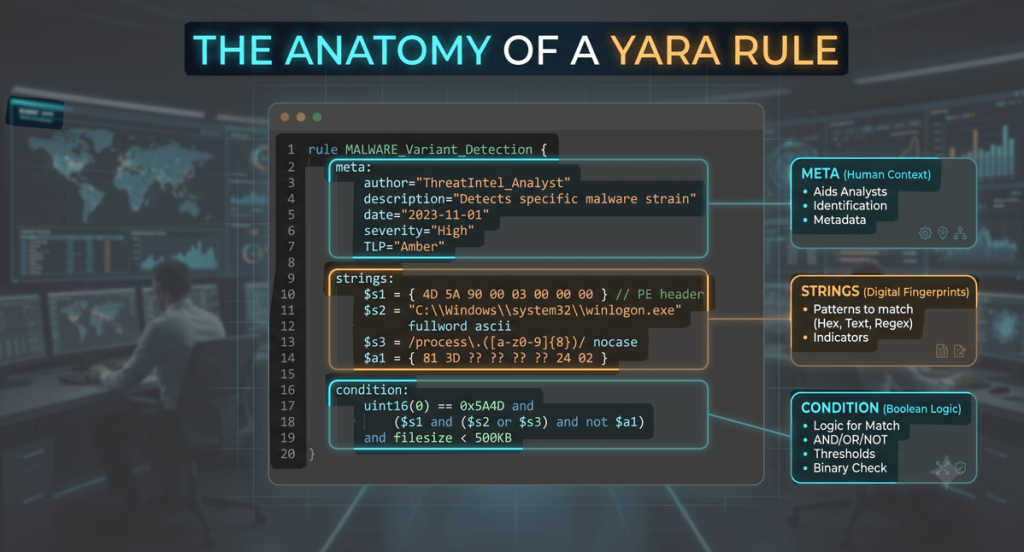
1.The Anatomy of a YARA Rule
A YARA rule is brilliantly simple in its structure. It reads almost like plain English and consists of three core components: the metadata, the string definitions, and the logical condition.
Here is a look at a clean, foundational rule designed to catch a hypothetical credential dumper:
rule Detect_Phantom_Dumper { // <====== THE META SECTION ======> // This block is just for humans; the scanning engine ignores it entirely. // This is where you leave context (author, description, date) so the // next analyst reading your rule at 3:00 AM knows exactly what it does. meta: author = "Secure Scroll SOC" description = "Detects strings associated with Phantom credential dumper" date = "2026-07-06" tlp = "CLEAR" severity = "High" // <====== THE STRINGS SECTION ======> // These are your digital fingerprints. Here you define the exact items // the engine is hunting for. You can declare plain text strings (like // malware error messages), regex, or raw hexadecimal byte sequences. strings: $str1 = "Phantom_Dump_v2.exe" ascii wide $str2 = "SAM_hash_extracted_successfully" ascii wide $hex_magic = { 4D 5A } // <--- Hex pattern for Windows Executable MZ header // <====== THE CONDITION SECTION ======> // This is the boolean logic that dictates when the rule actually fires. // Below, we state: the file MUST start with the Windows magic bytes // exactly at file offset 0, AND it must contain either $str1 or $str2. condition: $hex_magic at 0 and ($str1 or $str2)}
2. Writing High-Fidelity Rules (The Mid-Senior Play)
Entry-level analysts often make the mistake of writing rules that are too broad, matching common strings like “password” or “admin.” This results in catastrophic false positives, causing the rule to flag legitimate administrative tools. A mid-senior detection engineer writes rules that survive malware polymorphism (when malware changes its code slightly to evade detection) without destroying system performance.
Tactic 1: Hunting With Hexadecimal and Wildcards
Malware authors frequently obfuscate their text strings, but they often reuse the exact same underlying binary functions to execute their payloads. Instead of hunting for text, senior engineers hunt for hex patterns using wildcards and jumps.
strings: // Matches a specific sequence of assembly instructions, allowing for variable bytes in the middle $sneaky_hex = { E8 ?? ?? ?? ?? 85 C0 74 0A 48 8B [2-4] 33 C9 }
1. The Opening Action (E8): This specific hex byte translates to a CALL instruction, initiating the malware’s core payload function.
2. The Wildcards (?? ?? ?? ??): These question marks tell YARA to ignore the next four bytes, preventing the rule from breaking when the malware’s memory address naturally changes upon execution.
3. The Static Logic (85 C0 74 0A 48 8B): This sequence represents the malware’s fundamental, unchanging decision-making logic (like testing success and moving data) generated by the attacker’s compiler.
4. The Flexible Jump ([2-4]): This allows the scanning engine to glide over two to four random “junk bytes” that attackers intentionally inject to evade rigid antivirus signatures.
5. The Closing Sequence (33 C9): This translates to a standard assembly command (XOR) used to clear a register, serving as the final, reliable anchor for the pattern match.
Tactic 2: Performance Tuning
YARA has to scan millions of bytes. A poorly written rule will spike an endpoint’s CPU to 100%. To prevent this, detection engineers enforce strict constraints in the condition block:
- File Size Limits: If you are hunting for a tiny 50KB dropper, tell YARA to ignore any file larger than 1MB (
filesize < 1MB). - Specific Offsets: Don’t search an entire 10MB file for a header signature. Tell YARA exactly where to look (e.g.,
$hex_magic at 0).
3. The Integration Phase: Correlating YARA Hits in Splunk
A common industry misconception is that you can paste a YARA rule into a SIEM like Splunk to scan your network. Splunk does not natively run YARA rules against files; it is a text-based log aggregator. To operationalize YARA, the workflow looks like this:
- Install a scanning tool (like Velociraptor, Osquery, or an EDR) on your endpoints.
- The agent executes your YARA rule against local files or live memory.
- If the YARA rule triggers, the agent generates a JSON log and forwards it to Splunk.
- You use Splunk’s SPL (Search Processing Language) to hunt through those logs and correlate them with other telemetry.
The SOC Scenario
Your endpoint scanner just triggered the Detect_Phantom_Dumper YARA rule on a server. As an analyst, your immediate next question must be: “Did that malware execute and successfully phone home to the attacker?” To answer this, we will write a Splunk query that takes the host where the YARA rule fired, and cross-references it against Zeek DNS logs to see if that compromised machine reached out to a known bad domain in the minutes following the infection.
The Splunk SPL Query
// Step 1: Find the YARA match event in the endpoint logsindex=endpoint_security sourcetype=yara_scanner rule_name="Detect_Phantom_Dumper"| rename dest_host as infected_host, _time as match_time// Step 2: Join this with Zeek DNS logs to find outbound traffic from that same host| join type=inner infected_host [ search index=network sourcetype=zeek_dns | rename src_ip as infected_host]// Step 3: Filter for activity that occurred shortly after the YARA match| where _time >= match_time AND _time <= (match_time + 300)// Step 4: Format the output for the SOC dashboard| stats count by match_time, infected_host, rule_name, file_path, query| sort - match_time
The Analyst Interface (Simulated Splunk Output)
When you run this in Splunk, you aren’t looking at raw, messy text. You are generating a clean, actionable matrix that gives the incident responder exactly what they need to contain the threat.
Here is what that output looks like on the SOC dashboard:
🔍 New Search | index=endpoint_security sourcetype=yara_scanner rule_name=”Detect_Phantom_Dumper”…
1 Events (fast mode) | 📅 Last 24 Hours
match_time | infected_host | rule_name | file_path | query (DNS)
2026-07-06 13:15:02 | SRV-DB-04 | Detect_Phantom_Dumper | C:\Temp\Phantom_v2.exe | api.baddomain[.]com
The Engineering Takeaway
By combining YARA with Splunk, we have instantly transformed a static file signature into a dynamic behavioral hunt. The Splunk output above tells the Tier-3 responder three critical things:
- The Weapon: The YARA rule proved the exact malware family (
Phantom_v2.exe). - The Target: The host that needs to be isolated immediately (
SRV-DB-04). - The Impact: The network logs proved the malware executed and attempted to resolve a malicious Command and Control (C2) domain (
api.baddomain[.]com).
Conclusion: Taking Control of the Signature
Relying entirely on commercial antivirus means you are waiting for a vendor to tell you what is malicious. Writing your own YARA rules flips that dynamic. It gives the detection engineer absolute authority to define what is considered a threat in their specific environment.
By analyzing malware, extracting the unique technical indicators, and writing highly tuned YARA logic integrated directly into your SIEM, a SOC transforms from a passive monitoring station into an active, aggressive threat-hunting unit.
Stay Tactical.
⚖️ Legal & Operational Disclaimer
- Educational Purposes Only: The technical configurations, workflows, and YARA rule examples discussed in this article are provided strictly for educational and informational purposes.
- No Professional Liability: Security environments vary wildly. The author assumes no responsibility or liability for system downtime, performance degradation, or false positives resulting from the deployment of custom rules shown in this post. Always test YARA rules in an isolated sandbox or against a known-good baseline before deploying them to a live enterprise network.
- System Impact Warning: Poorly optimized YARA rules can cause severe CPU spikes and memory consumption on production endpoints. Ensure proper performance testing and size constraints are applied prior to fleet-wide execution.
Leave a Reply